 Easy Twin
Print the twin worksheet in one tap
Every twin worksheet is ready to print as a clean, US Letter PDF with a name and date line, numbered questions, and room to show work. Print it over AirPrint, or share the PDF to print from a computer, with an optional answer key on its own pages for you.

Why print practice instead of using a screen?
Paper matches how school works. Most homework and tests are still on paper, so printed practice lets your child show their work, cross things out, and get used to the format they'll see in class. It also keeps practice away from a device. Easy Twin gives you both from the same twin, so you can print on some days and play on others. We compare the two in printable vs. on-screen practice.
How does print worksheets work?
Open the twin
Open any worksheet in your library and switch to the Print tab.
Choose the options
Add your child's name if you like, and turn the answer key on or off.
Print or share
Tap Print to send it to an AirPrint printer, or Share to save or send the PDF.
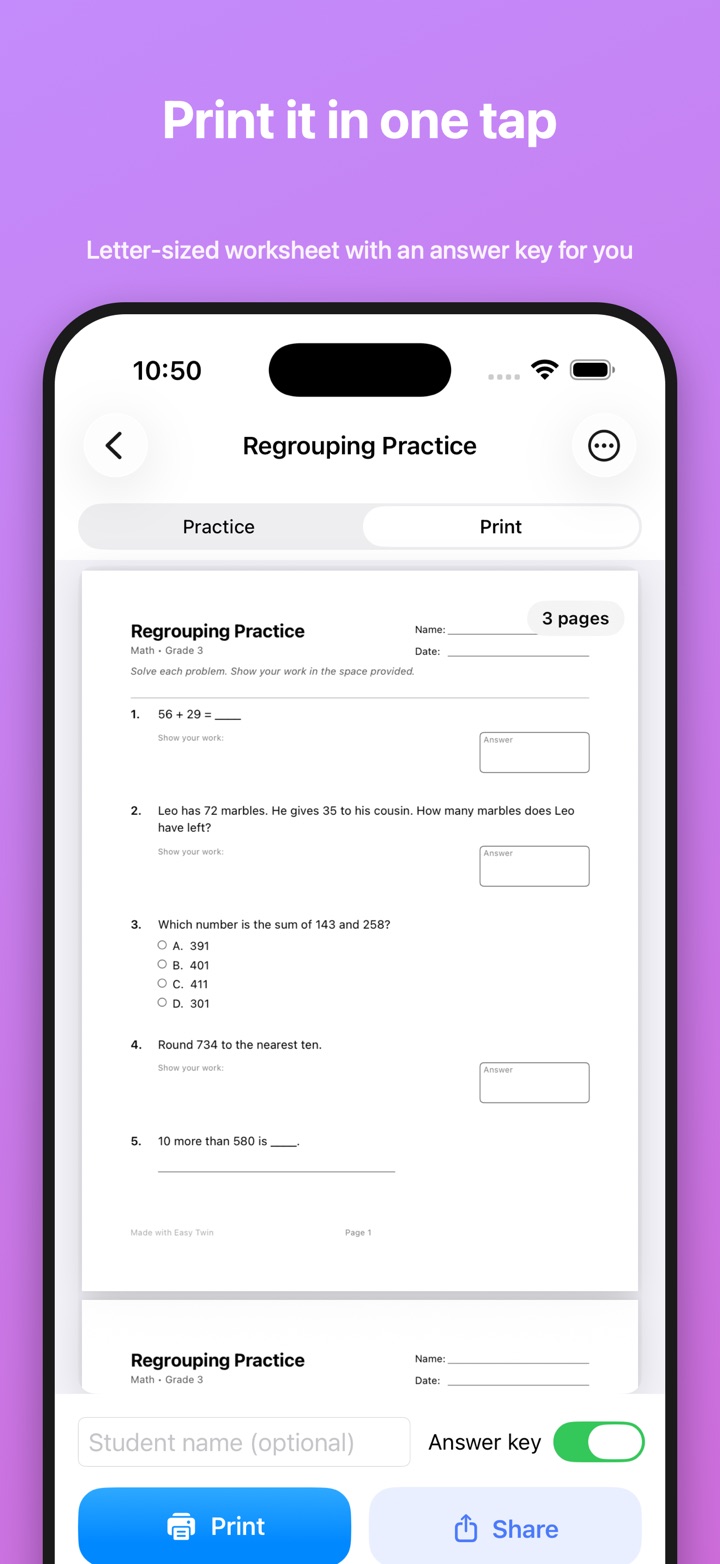

What does the printed worksheet look like?
The PDF is formatted like a real school worksheet:
- US Letter size (8.5 × 11 inches) with comfortable 0.75-inch margins
- Name and date lines in the header, plus the worksheet title, subject, and grade
- Numbered questions in the original order, with generous space to show work
- Tables, bar graphs, number lines, and clocks drawn cleanly with the new data
- Page numbers, so a multi-page twin stays in order
- An optional answer key at the end, for grown-ups
You can type your child's name to print it on the sheet, and choose whether the answer key is included by default in Settings.
Which printers work?
Any AirPrint-compatible printer on the same Wi-Fi network works. No printer at home? Tap Share to save the PDF, send it to yourself, and print it from a computer, at a library, or at work.
When do parents use print worksheets?
Practice that looks like the real test
A printed twin has the same layout and question types as the class worksheet, which helps before a quiz.
Homeschool mornings
Print tomorrow's practice the night before and keep the answer key in your own folder.
Screen-free practice
For kids who drift on a phone, paper and a pencil keep the focus on the problems.
Can I print just the questions my child got wrong?
Yes. After a practice session on the phone, the Review Sheet prints only the questions your child struggled with, with its own optional answer key.
Frequently asked questions
Do I need a special printer?
No. Any AirPrint-compatible printer on the same Wi-Fi network works. Without a printer, tap Share to save the PDF and print it from a computer.
Does the printed worksheet include an answer key?
Yes, if you want it. The answer key is optional and prints at the end, for grown-ups. You can turn it on or off for each print and set the default in Settings.
What paper size does it print?
Worksheets print on US Letter (8.5 × 11 inches) with 0.75-inch margins, a name and date line, numbered questions, room to show work, and page numbers.
Can I put my child's name on the worksheet?
Yes. Type a student name before printing and it appears in the header. You can also save your child's first name in Settings, which Easy Twin may also use for a character in word problems.
Related features
Twin worksheet generator
Every question rewritten to practice the same skill with new numbers, names, and wording.
Review Sheet
Print only the questions your child struggled with, with an optional answer key.
Scan a worksheet
Photograph any homework page or test with the document camera, one page or a whole packet.
Which subjects and grades does it work with?
Print worksheets works across every subject and grade Easy Twin supports, from kindergarten through 8th grade.
Guides for parents
Homeschool Worksheet Ideas: Getting More Out of the Curriculum You Already Have
You rarely need a new curriculum to get more practice. This guide shows homeschooling parents how to turn any workbook page into fresh practice, run short mastery checks, and build review into the week, with a simple way to decide between printable and on-screen days.
Printable vs. on-screen practice: what works better for kids?
Neither paper nor screen wins every time. Research shows a small comprehension edge for paper when reading informational text and a benefit of handwriting for learning letters, while on-screen practice is better at instant feedback and hints. Most families do best using paper for reading, writing and multi-step work and a screen for quick checks and feedback.
Summer Learning Loss: A 15-Minute-a-Day Practice Plan
Kids learn more slowly over the summer, but how much they actually lose is debated and varies a lot from child to child. A short, steady routine built from last year's worksheets is an easy, low-stress way to keep skills warm. This guide explains the research honestly and gives you a week-by-week 15-minute plan.

Try Easy Twin on tonight's worksheet
Download free and get 3 free scans. Scan a page, get a twin, then print it or let your child play it.
Download on theApp StoreRequires iOS 26 or later. Works on iPhone and iPad.
- 3 free scans to start
- No ads, no tracking
- Kindergarten to 8th grade