 Easy Twin
Interactive practice your child can do on the phone
Every twin worksheet can also be played as a quiz on iPhone or iPad. Your child gets three tries per question, two hints that nudge without giving the answer away, and forgiving answer checking, and answers are only revealed on the summary screen at the end. Practice is unlimited and never uses a scan.

How does the practice quiz work?
The quiz shows one question at a time in a format made for small hands: a number keypad for number answers, big buttons for multiple choice, and a text field for words. Your child answers, gets instant feedback, and moves on. Each question allows three tries. Wrong multiple-choice picks are crossed out so they can't be chosen again, and after three misses the question is set aside ("parked") and its answer waits for the summary screen, so no one gets stuck forever on one problem.
How does interactive practice work?
Start the quiz
Open a twin and tap Start practice quiz. Hand over the phone.
Answer and get feedback
Your child answers each question and hears, sees, and feels a small celebration when it's right: bigger for first-try answers.
Use hints if needed
Two hints are available per question, and up to three tries.
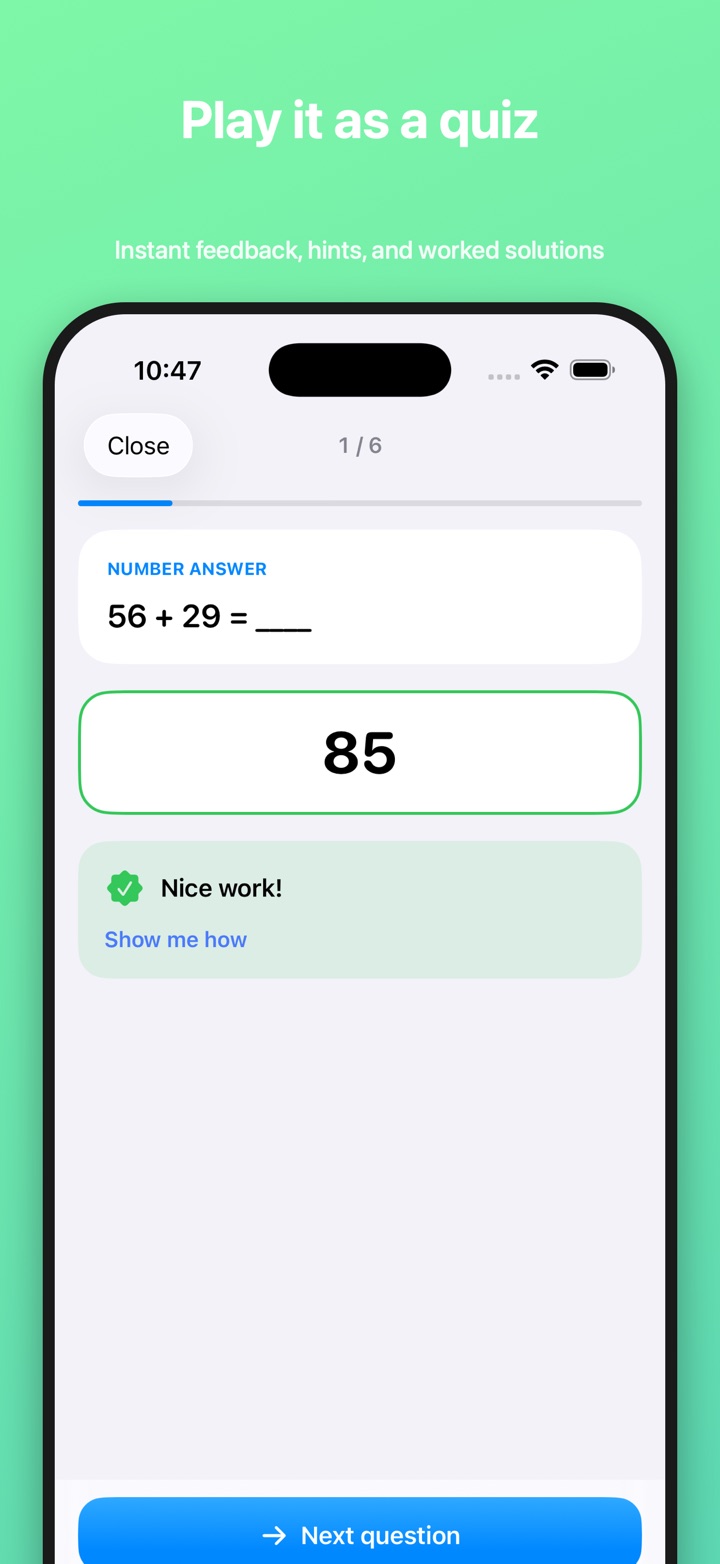
Review the summary
See the score, badges, streak, the answers, and the worked solutions.

How do the hints work?
Every question has exactly two hints, and they build on each other. The first is a gentle guiding question that points at the idea without doing any of the work ("Look at the denominators first. Are they the same?"). The second gives a concrete first step without stating the answer ("What is 3 × 4 before we add 2?"). Answers are never shown mid-quiz. After the quiz, the summary reveals the answers and the worked solution steps behind each one.
What counts as a right answer?
The grading is forgiving about format and strict about the math or the word. It ignores capital letters, extra spaces, and trailing punctuation, and treats curly and straight apostrophes the same. Number answers are matched by value, so 0.5, 1/2, and "1 1/2" are understood, money and percentages work, and trailing units are ignored ("37 marbles" and "12cm" count). For multiple choice, the letter or the choice text both work. Questions that ask your child to explain in their own words are self-checked: they compare their answer with a model answer and a few key points.
When do parents use interactive practice?
Waiting at practice or in the car
A short quiz on the phone turns ten spare minutes into useful review.
A child who melts down over mistakes
Three tries and hints that never scold keep things low-stakes.
You can't sit with them tonight
Hints and forgiving checking let your child work on their own, and the insights show you how it went later.
What happens if my child stops halfway?
Their progress is saved. Close the app mid-sheet and the worksheet offers Pick up where you left off (for example, "3 of 10 done") or Start over. Only active time counts toward practice minutes, so a quiz left open on the kitchen table won't inflate the numbers. Every finished quiz feeds progress insights and can earn badges.
Does interactive practice cost credits?
No. Credits are only used when you scan a page to create a twin. Your child can replay any twin as many times as you like. See pricing.
Frequently asked questions
Does practicing use credits?
No. Credits are only used when you scan a page to create a twin. Your child can play any twin as a quiz as many times as you like.
How many tries does my child get?
Your child gets three tries per question and two hints. After three misses the question is set aside, and its answer waits for the summary screen at the end. Answers are never shown mid-quiz.
Will it mark a right answer wrong because of formatting?
It tries hard not to. Grading ignores capitals, extra spaces, and trailing punctuation, accepts equivalent numbers like 1/2 and 0.5 or mixed numbers like 1 1/2, handles money and percentages, and ignores units such as "12 cm". For multiple choice, the letter or the text both count.
How are "explain your thinking" questions checked?
Written-response questions are self-checked: your child compares their answer with a model answer and the key points a good answer should include. Easy Twin prefers auto-graded formats whenever a question has one definite answer.
Can my child stop and finish later?
Yes. Progress saves automatically, and the worksheet offers "Pick up where you left off" or "Start over". Time with the app closed doesn't count toward practice minutes.
Related features
Badges and rewards
Eight badges and a daily streak that reward effort and comebacks, not just perfect scores.
Twin worksheet generator
Every question rewritten to practice the same skill with new numbers, names, and wording.
Progress insights
A parent dashboard: first-try accuracy, minutes practiced, streaks, and the skills that need work.
Which subjects and grades does it work with?
Interactive practice works across every subject and grade Easy Twin supports, from kindergarten through 8th grade.
Guides for parents
Fractions practice at home: a parent's guide by grade
Fractions usually start in 1st or 2nd grade with halves and fourths of shapes and build to dividing fractions in 6th grade. This guide lays out what is commonly taught at each grade, the mistakes parents see most, and short, low-prep ways to practice fractions at home.
Homeschool Worksheet Ideas: Getting More Out of the Curriculum You Already Have
You rarely need a new curriculum to get more practice. This guide shows homeschooling parents how to turn any workbook page into fresh practice, run short mastery checks, and build review into the week, with a simple way to decide between printable and on-screen days.
How to Help Your Child Practice for a Math Test at Home
The best way to help your child practice for a math test at home is short, mixed practice spread over several days, with your child doing the recalling and you giving calm feedback. This guide gives parents a day-by-day plan, questions to ask, and scripts for the moment a child gets stuck.

Try Easy Twin on tonight's worksheet
Download free and get 3 free scans. Scan a page, get a twin, then print it or let your child play it.
Download on theApp StoreRequires iOS 26 or later. Works on iPhone and iPad.
- 3 free scans to start
- No ads, no tracking
- Kindergarten to 8th grade